web
You’re offline. This is a read only version of the page.
close
Skip to main content

Notifications

Announcements

Community site session details

Community site session details

Session Id :
Customer experience | Sales, Customer Insights,...
Answered

Need to add today's date on marketing email dynamically

(0) ShareShare
ReportReport
Posted on by

Hi all,

I have a requirement to add a date on the marketing email but there is no option to add the date dynamically on marketing module email designer, is there any way to do that ?

Thanks

I have the same question (0)
  • Suggested answer
    d_radulova Profile Picture
    2 User Group Leader on at

    Hi @Asmat ,

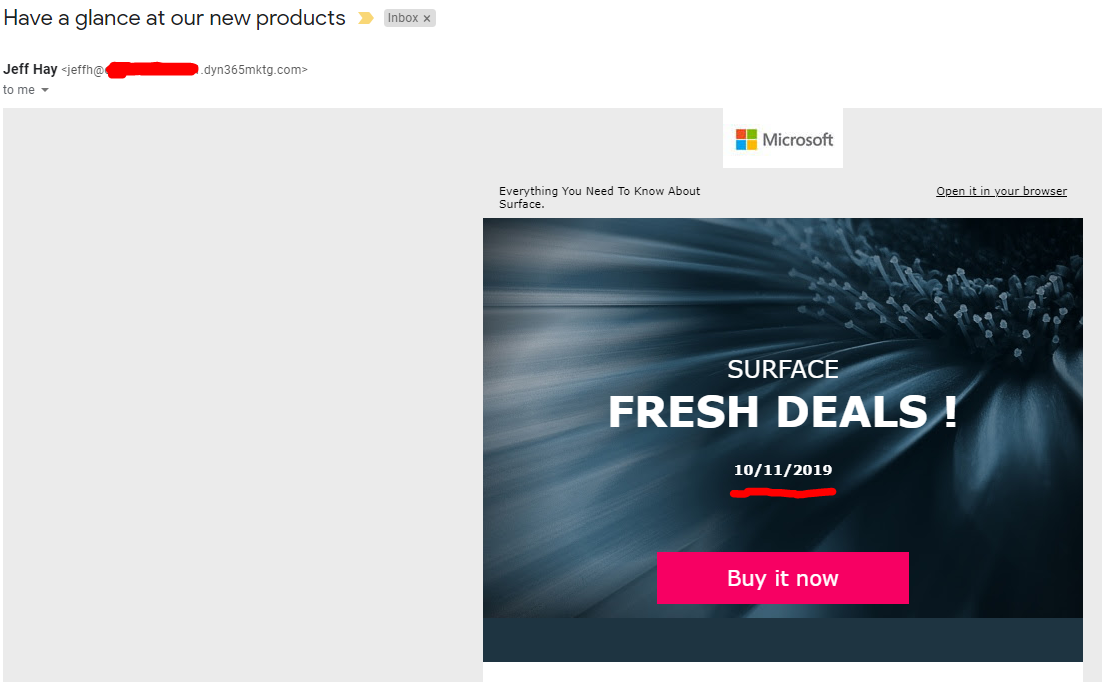
    I managed to do it with JavaScript and it works OK when you open the email in a browser. I am not convinced it would work in all mailboxes though, needs testing. I think different email providers (yahoo, hotmail, etc) or even users might have different policies on JavaScript..

    The code I used was - 

    <p id="demo12345"></p>
    *** the rest of the HTML****
    <script>
    document.getElementById("demo12345").innerHTML = new Date().toISOString().slice(0, 10);
    </script>

    pastedimage1570747006068v2.png

    Thanks,

    -DD

  • Verified answer
    cloflyMao Profile Picture
    25,208 on at

    Hi Fariha,

    As Dilyana suggested, javascript would be a simple way to display current date on marketing emaill,

    and it might be blocked by different email service providers due to secutiy policy such as Gmail.

    I suggest you could build a custom entity called Date Assistance, create one record of this entity to save current date, 

    then embed it in marketing email content as dynamic content and send to contacts,

    the benefit is that the date text is actually processed by CRM back-end and will be regarded as just text element in marketing email,

    and the potential disadvantage is that if your target contacts are far from your time zone(e.g: China to USA), you might need another record with time zone only date field to these contacts.

    Steps:

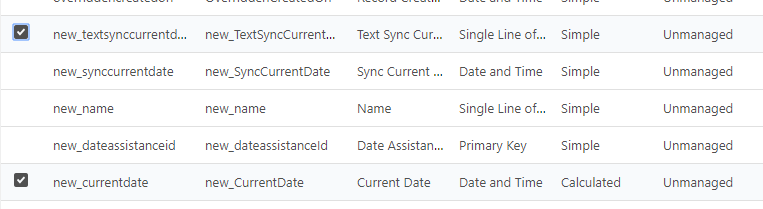
    1. In custom Date Assistance entity, create a calculated date and time field with NOW() function.

    2. Create another field Sync Text Current Date, it will save formatted MM/DD/YYYY date and we'll work with this single line text field to be sent.(because I found that calculated field data won't be shown in marketing email from my test)
    pastedimage1570763534284v2.png

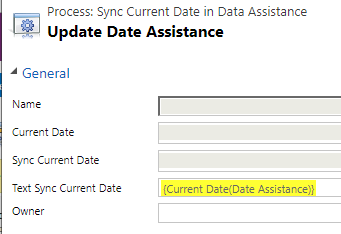
    3. Build an on-demand workflow or recurring workflow (With methods below, you won't pay for 3rd party solution.):

    Pure way:

    https://crmbusiness.wordpress.com/2011/05/24/crm-2011-how-to-schedule-recurring-workflows-in-crm-2011/

    https://blogs.msdn.microsoft.com/mvpawardprogram/2013/03/11/scheduling-recurring-workflows-in-microsoft-dynamics-crm-2011-online-and-on-premise/(tutorial video)

    https://www.powerobjects.com/blog/2012/11/09/create-recursive-or-scheduled-workflows-in-crm/

    Open source solution:

    https://community.dynamics.com/crm/b/alexanderdevelopment/posts/updated-solution-for-scheduling-recurring-dynamics-365-workflows

    https://alexanderdevelopment.net/post/2016/09/19/updated-solution-for-scheduling-recurring-dynamics-crm-workflows/

    Create a simple console app and run it with Windows Task Scheduler:

    to sync calculated current date to the text date field with formatted data.
    pastedimage1570763776028v4.png

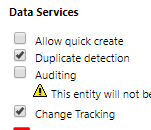
    4.1 Enable Change Tracking option for Date Assistance entity.(to be available as dynamic content entity in marketing email)
    pastedimage1570763703929v3.png

    4.2 Enable the Date Assistance entity in Marketing data configuration. (to be available as dynamic content entity in marketing email)
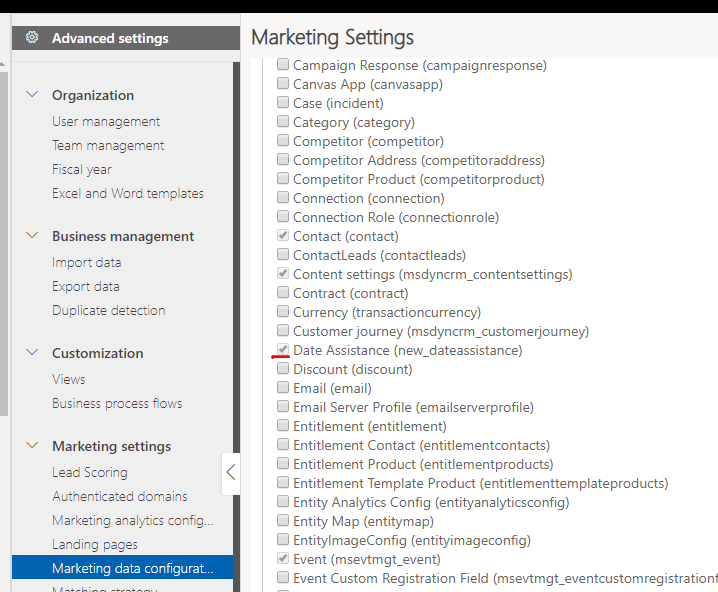
    pastedimage1570763898776v5.png

    5.  Embed the field to marketing email content with Assist-edit
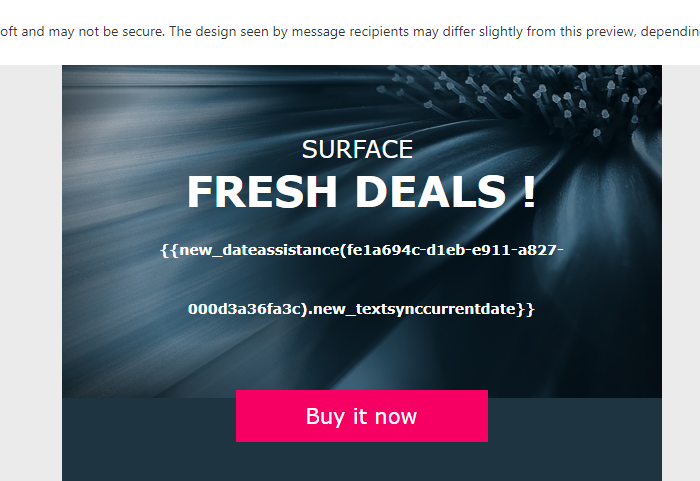
    pastedimage1570763999528v6.png

    Result:

    pastedimage1570764184825v2.png

    Regards,

    Clofly

  • Fariha Asmat Profile Picture
    on at

    Thanks Dilyana,

    For the reply but in my case i want show this on email and it won't works with gmail and some other mail boxes

  • Fariha Asmat Profile Picture
    on at

    Thanks Clofly,

    It is really helpful :)

  • d_radulova Profile Picture
    2 User Group Leader on at

    Morning guys,

    After literally sleeping on this, I have completely changed my mind on JavaScript.  The code is fine, but it will always display the date of when the email is opened. So if the emails stays in a customer inbox for a few days, with JavaScript the date displayed will be the email opened date, rather than email sent (which feels very wrong and slightly creepy).

    Thanks,

    -DD

  • slx Profile Picture
    386 on at

    Could we add datetime in a condition ?

    <!-- #if (gt this.createdon '2023-01-01') -->

    ?

    thank you

Under review

Thank you for your reply! To ensure a great experience for everyone, your content is awaiting approval by our Community Managers. Please check back later.

Helpful resources

News and Announcements

[Smoke test 2510.1]

Quick Links

Mansi Soni – Community Spotlight

We are honored to recognize Mansi Soni as our August 2025 Community…

Announcing our 2025 Season 2 Super Users!

A new season of Super Users has arrived, and we are so grateful for…

Congratulations to the July Top 10 Community Leaders!

These are the community rock stars!

Leaderboard > Customer experience | Sales, Customer Insights, CRM

Last 30 days Overall leaderboard

Product updates

Dynamics 365 release plans