web
You’re offline. This is a read only version of the page.
close
Skip to main content

Notifications

Announcements

Community site session details

Community site session details

Session Id :
Finance | Project Operations, Human Resources, ...
Unanswered

Download multiple SSRS report documents when printed in single execution

(0) ShareShare
ReportReport
Posted on by 2,100

Hi Techies,

I have written a custom process where SSRS report is downloading a pdf file twice if it matches certain criteria.

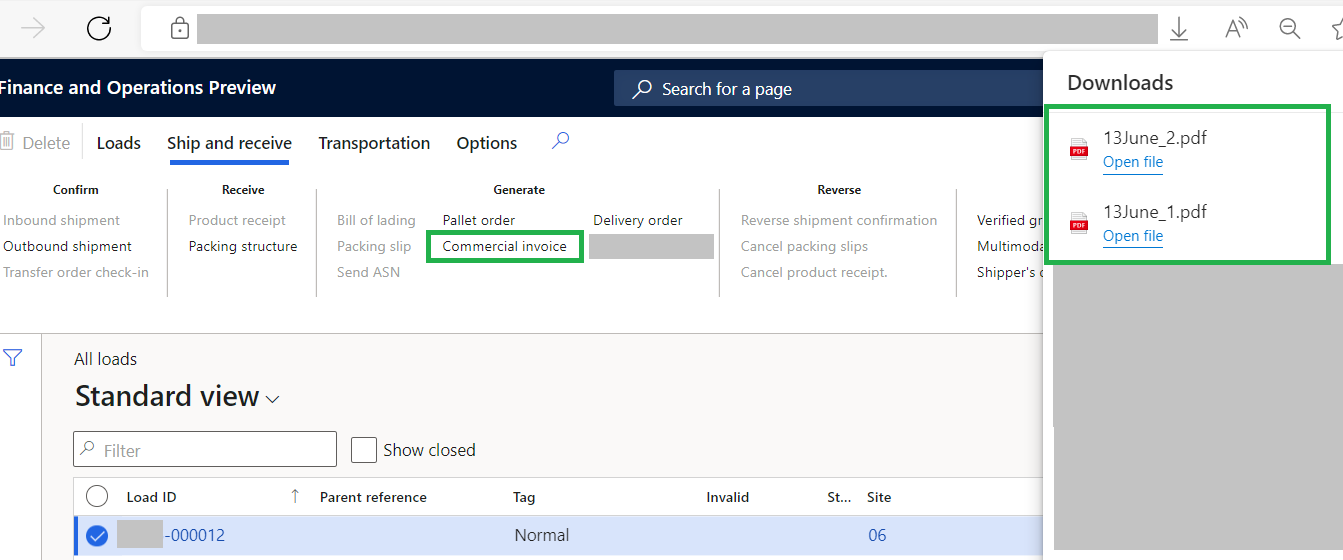
Below are two screenshots to help you understand bit more. Commercial invoice button calls a custom code with selected Load Id and opens a screen where user can add print setup, as shown below setting is selected as file and on executing two files are downloading because it's matching criteria on load lines.
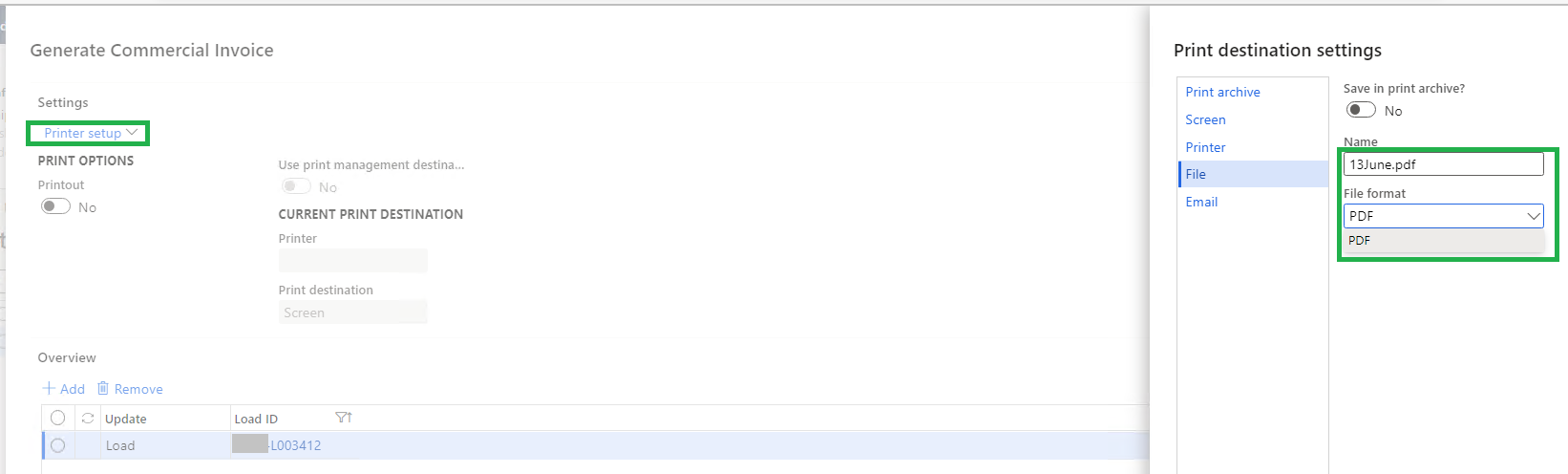
pastedimage1655119365957v2.png

pastedimage1655119255048v1.png

This works fine on VM. Whereas it is very inconsistent on SIT environment. It was working till now, abruptly it started downloading only second file (_2).

Controller class is getting called twice. Upon debugging code works fine on DEV. It worked on SIT also but it's inconsistent. Can anyone give some inputs in this issue. Is there any additional code I can add here or something is missing from configuration side.

public static void main(Args _args)
{
CommercialInvoiceController commercialInvoiceController;

if (_args.parm()
|| (_args.record() && _args.dataset() == tableNum(WHSLoadTable)
|| _args.dataset() == tableNum(BIGCommercialInvoiceJournal)))
{
commercialInvoiceController = new BIGCommercialInvoiceController();
commercialInvoiceController.parmArgs(_args);
commercialInvoiceController.parmReportName(ssrsReportStr(CommercialInvoiceReport, Report));
commercialInvoiceController.parmDialogCaption("@ShowingCommercialInvoice");
commercialInvoiceController.parmShowDialog(false);

if (_args.caller() is CommercialInvoiceProcessJournal)
{
SRSPrintDestinationSettings printSettings;
Filename filepath;
Filename filename;
Filename fileType;

printSettings = _args.caller().parmPrintJobSettings();

Filename reportFileName = printSettings.parmFileName();

if (reportFileName)
{
[filepath, filename, fileType] = fileNameSplit(reportFileName);

if (_args.caller().parmPrintCounter() == 2)
{
filename = subStr(filename, 1, strLen(filename)-2);
}

reportFileName = strFmt("%1%2%3%4",filename,"_",_args.caller().parmPrintCounter(),fileType);
printSettings.parmFileName(reportFileName);
}

commercialInvoiceController.parmReportContract().parmPrintSettings(printSettings);
}

commercialInvoiceController.startOperation();
}
else
{
throw error(Error::wrongUseOfFunction(funcname()));
}
}

Thank you in advance!

Regards,

Sangram

I have the same question (0)
  • Martin Dráb Profile Picture
    235,243 Most Valuable Professional on at

    Your code is very difficult to read, because you pasted it in a wrong way and all line indentation got lost. Please use Insert > Code (in the rich formatting view) next time. This is how it'll look like:

    public static void main(Args _args)
    {
    	CommercialInvoiceController commercialInvoiceController;
    
    	if (_args.parm()
    		|| (_args.record() && _args.dataset() == tableNum(WHSLoadTable)
    		|| _args.dataset() == tableNum(BIGCommercialInvoiceJournal)))
    	{
    		commercialInvoiceController = new BIGCommercialInvoiceController();
    		commercialInvoiceController.parmArgs(_args);
    		commercialInvoiceController.parmReportName(ssrsReportStr(CommercialInvoiceReport, Report));
    		commercialInvoiceController.parmDialogCaption("@ShowingCommercialInvoice");
    		commercialInvoiceController.parmShowDialog(false);
    
    		if (_args.caller() is CommercialInvoiceProcessJournal)
    		{
    			SRSPrintDestinationSettings printSettings;
    			Filename filepath;
    			Filename filename;
    			Filename fileType;
    
    			printSettings = _args.caller().parmPrintJobSettings();
    
    			Filename reportFileName = printSettings.parmFileName();
    
    			if (reportFileName)
    			{
    				[filepath, filename, fileType] = fileNameSplit(reportFileName);
    
    				if (_args.caller().parmPrintCounter() == 2)
    				{
    					filename = subStr(filename, 1, strLen(filename)-2);
    				}
    
    				reportFileName = strFmt("%1%2%3%4",filename,"_",_args.caller().parmPrintCounter(),fileType);
    				printSettings.parmFileName(reportFileName);
    			}
    
    			commercialInvoiceController.parmReportContract().parmPrintSettings(printSettings);
    		}
    
    		commercialInvoiceController.startOperation();
    	}
    	else
    	{
    		throw error(Error::wrongUseOfFunction(funcname()));
    	}
    }

  • Sangram Shinde Profile Picture
    2,100 on at

    Thank you Martin for this rich formatting, however I tried same while drafting a question, but somehow it didn't work.

Under review

Thank you for your reply! To ensure a great experience for everyone, your content is awaiting approval by our Community Managers. Please check back later.

Helpful resources

News and Announcements

[Smoke test 2510.1]

Quick Links

Mansi Soni – Community Spotlight

We are honored to recognize Mansi Soni as our August 2025 Community…

Announcing our 2025 Season 2 Super Users!

A new season of Super Users has arrived, and we are so grateful for…

Congratulations to the July Top 10 Community Leaders!

These are the community rock stars!

Leaderboard > Finance | Project Operations, Human Resources, AX, GP, SL

Last 30 days Overall leaderboard

Product updates

Dynamics 365 release plans
