web
You’re offline. This is a read only version of the page.
close
Skip to main content

Notifications

Announcements

Community site session details

Community site session details

Session Id :
Customer experience | Sales, Customer Insights,...
Suggested Answer

HTML Code in InvalidPluginExecutionException Message on Connection Form

(0) ShareShare
ReportReport
Posted on by 172

Hi everybody,

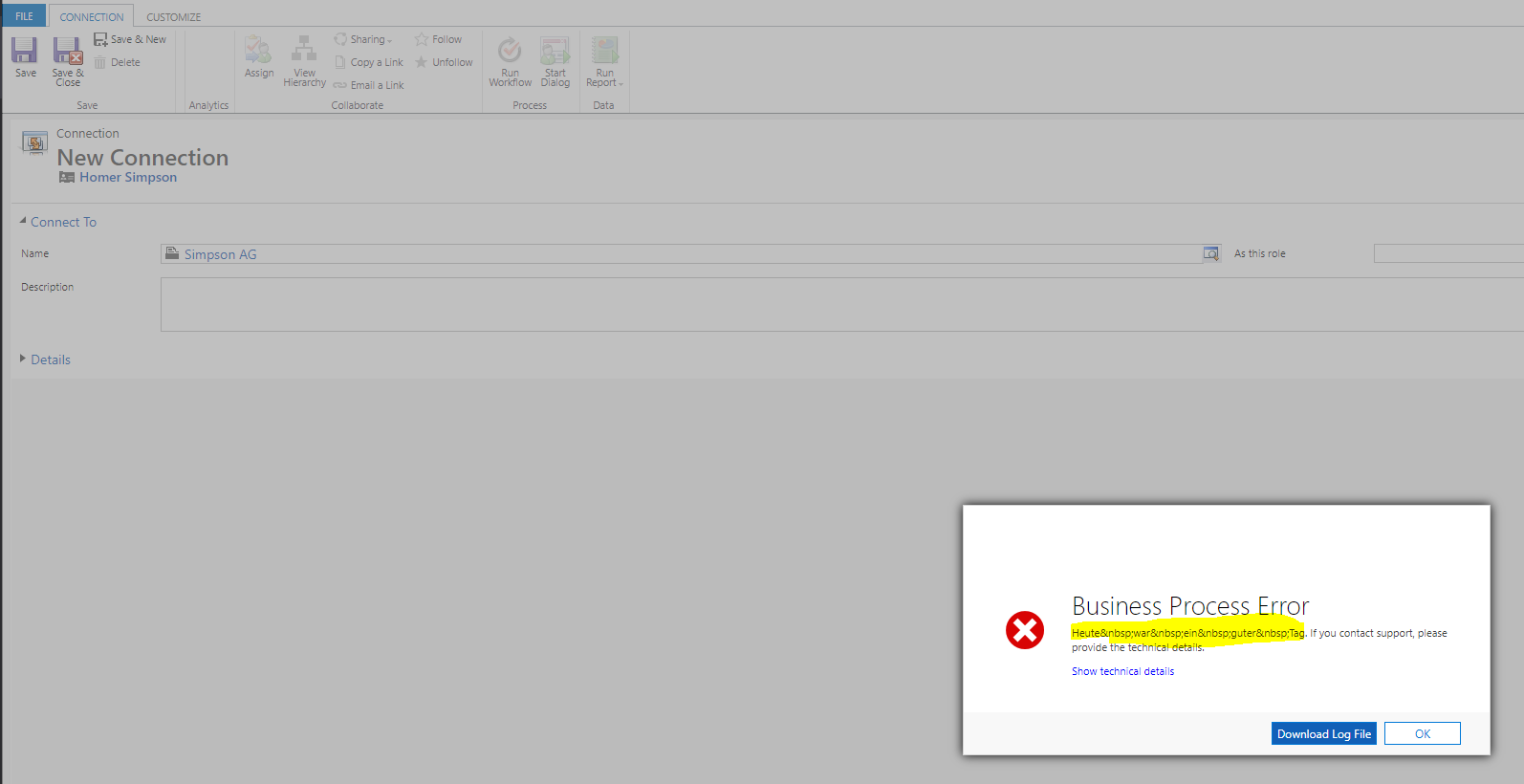
I hope you are well. I have an Dynamics 365 9.0.18.12 and have the Problem, that the Message for InvalidPluginExecutionException contains only on the connection Form HTLM Code in the error Message.

I registered the same Plugin on the contact Form and the message is right. See below picture

pastedimage1599849101768v1.png

Error Message in Contact:

pastedimage1599849197123v2.png

Error Message in Connection:

pastedimage1599849278805v3.png

My Code:


if (context.InputParameters.Contains("Target") &&
                context.InputParameters["Target"] is Entity)
            {
                // Obtain the target entity from the input parameters.  
                Entity entity = (Entity)context.InputParameters["Target"];

                // Obtain the organization service reference which you will need for  
                // web service calls.  
                IOrganizationServiceFactory serviceFactory =
                    (IOrganizationServiceFactory)serviceProvider.GetService(typeof(IOrganizationServiceFactory));
                IOrganizationService service = serviceFactory.CreateOrganizationService(context.UserId);

                try
                {
                    var owner = entity.GetAttributeValue("ownerid");
                    if (owner.LogicalName == "systemuser")
                    {
                        throw new InvalidPluginExecutionException(OperationStatus.Canceled);
                    }
                } catch(InvalidPluginExecutionException ex)
                {
                    throw new InvalidPluginExecutionException("Heute war ein guter Tag.", ex);
                }
            }

Anybody an Idea how can i fix it?

Thanks for help.

I have the same question (0)
  • Suggested answer
    Bipin D365 Profile Picture
    28,981 Moderator on at

    Hi,

    Can you try to store the exception in one string variable and then pass this variable to InvalidPluginExecutionException.

    String errorDetails="Heute war ein guter Tag."+ex.toString();

    throw new InvalidPluginExecutionException(errorDetails);

    Please mark my answer verified if i were helpful

  • Daniel Schneider Profile Picture
    172 on at

    Result in Contact Form:

    pastedimage1599898640336v1.png

    Result in Connection Form:

    pastedimage1599898713589v2.png

    Same issue. =)

  • Suggested answer
    Syed Ibrahim Profile Picture
    on at

    Hi Daniel,

    Try this :

    throw new InvalidPluginExecutionException($"Heute war ein guter Tag.", ex);


    Hope this helps

  • Daniel Schneider Profile Picture
    172 on at

    Hi Syed,

    thanks for your answer. Here is the result of your solution.

    Contact Form:

    pastedimage1599904554034v1.png

    Connection Form:

    pastedimage1599904631086v2.png

    Same issue =(. What I don´t know is why it is only on connections... I tried different SDK Versions from 8.0.0 to the latest in my Plugin. In CRM 8.2 OnPremise in Connection these issue is not there.

  • Community Member Profile Picture
    6,120 on at

    There are some plugins InvaligPluginException based on some conditions to stop the Email being sent. But user should not be shown the Business process dialogue. The code seems to do exact same thing but for our situation, this is not working. Can you please give some idea on how to get saveErrorResponse and stop the Dialogue being displayed.

  • Daniel Schneider Profile Picture
    172 on at

    I don´t know if i understand you right but i use it like following:

    if(owner.LogicalName == "systemuser"){

    throw new InvalidPluginExecutionException(OperationStatus.Cancel, "yourMessage");

    }

    Can you please describe what you mean?

  • Naveen Ganeshe Profile Picture
    3,397 User Group Leader on at

    Hi Daniel,

    can you try this one?

    try

                   {

                       var owner = entity.GetAttributeValue<EntityReference>("ownerid");

                       if (owner.LogicalName == "systemuser")

                       {

                           throw new InvalidPluginExecutionException(OperationStatus.Canceled, "yourMessage");

                       }

                   } catch(InvalidPluginExecutionException ex)

                   {

                       throw new InvalidPluginExecutionException("Heute war ein guter Tag." + ex.Message);

                   }

  • Daniel Schneider Profile Picture
    172 on at

    Hi Naveen,

    thanks for your Solution but it doesn´t work. See below...

    Contact Form:

    pastedimage1599977674784v1.png

    Connection Form:

    pastedimage1599977753023v2.png

    It is right that the contact and connection forms are different? Because it looks so for me. In Contact you have no WebApi Query but in Connection it is so. Thats sounds for me that we make an retrieve and the response in the InvalidPluginExecutionException is not formated. I don´t know if its right. But now i have no more ideas.

    Thanks Naveen =)

  • Daniel Schneider Profile Picture
    172 on at

    Any ideas?

  • Daniel Schneider Profile Picture
    172 on at

    Hi all,

    I have need Information. I created an App in 9.0.2.20 CRM Version and in Contact and Connection and the message is displayed correctly. But  only in Unified Interface. Hmm now anybody an idea?

    Thanks for help...

Under review

Thank you for your reply! To ensure a great experience for everyone, your content is awaiting approval by our Community Managers. Please check back later.

Helpful resources

News and Announcements

[Smoke test 2510.1]

Quick Links

Mansi Soni – Community Spotlight

We are honored to recognize Mansi Soni as our August 2025 Community…

Announcing our 2025 Season 2 Super Users!

A new season of Super Users has arrived, and we are so grateful for…

Congratulations to the July Top 10 Community Leaders!

These are the community rock stars!

Leaderboard > Customer experience | Sales, Customer Insights, CRM

Last 30 days Overall leaderboard

Product updates

Dynamics 365 release plans