web
You’re offline. This is a read only version of the page.
close
Skip to main content

Notifications

Announcements

Community site session details

Community site session details

Session Id :
Customer experience | Sales, Customer Insights,...
Suggested Answer

unable to edit marketing page

(0) ShareShare
ReportReport
Posted on by

Did anyone recently had issues editing marketing pages? I have the same issue on existing subscription page that is live and on the new one I create now directly from template.

Regardless of which component I try to edit I just get text component options popping up. Basically I cannot add a form which is what I am trying to do. Friday everything worked normal. I also tried multiple browsers but nothing helped. Has anyone came across the same problem?

Antonio

I have the same question (0)
  • cloflyMao Profile Picture
    25,208 on at

    Hi Antonio,

    1. Do you mean that you created new marketing page from an existing live record by clicking pastedimage1585620126983v1.png  button?

    2. Was "struct-1c" the template you chose?

    3. Please check whether these elements have generated in HTML code of marketing page:

    * <div data-editorblocktype="FormBlock" data-form-block-id="xxxx"></div> -------> Container for marketing form

    * <meta datatype="xxx" label="xxx" name="xxx" type="xrm/designer/setting" value="xxx"> -------> Tags for editable content block such as text and image.
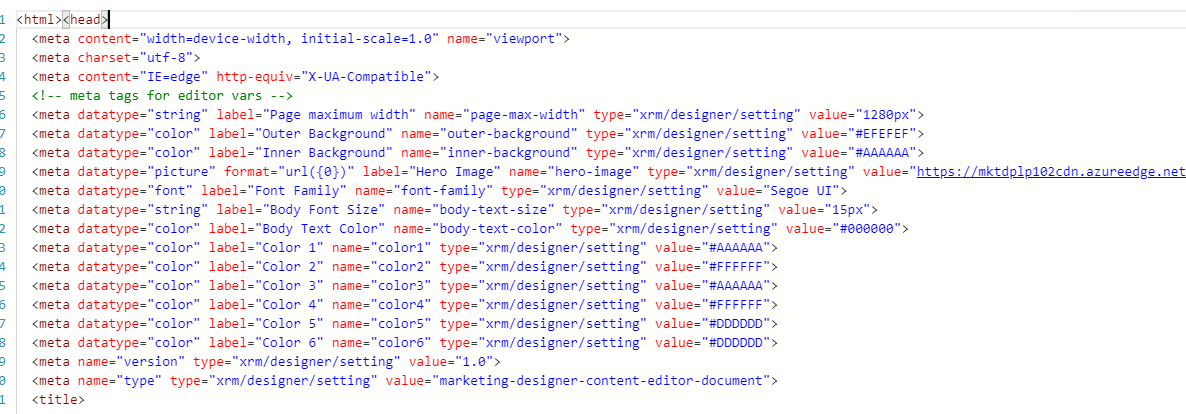
    pastedimage1585620812515v2.png

    In addition, you could try whether my marketing page could be edited in you environment:


            Subscription Centre


    Hero image

    Innovia

    management center

    [Welcome message for the subscribing contact]


    Regards,

    Clofly

  • Community Member Profile Picture
    6,120 on at

    To find incoming submissions for any form:

    Go to Marketing > Internet marketing > Marketing forms to open a list of existing forms.

    Find and open the form you want to inspect.

    Go to the Form submissions tab. Incoming forms that haven't been processed yet are listed here as pending. If any failed submissions have been received, you'll see them listed here too. If you've configured the form to store all incoming submissions, then you'll also see successful submissions here. The Status Reason column reports the pending/success/fail status of each submission.

  • Suggested answer
    Defne Ayanoglu Profile Picture
    2 on at

    Hi Antonio,

    Would you walk us through your steps following a new template opened or Edit button clicked, does it happen after you click a specific place in the editor?
    Does the HTML editor work fine?  

    Maybe you could share a screenshot of what happens.

    From what you are describing now, it sounds like a specific problem, and it might be best to file a support ticket


    Best regards, 
    Defne

  • AntonioV Profile Picture
    on at

    Hi Clofly,

    Thank you for the detailed answer.

    Yes, tags for form were there, it was the cadiz template. I ended up reinstalling Chrome, after which it started working, Not really sure what was the cause. The editor was simply unresponsive.

    @Dafne, Edit worked fine, it was when I tried clicking on the editor. Seems like it was stg local/with my laptop.

    Thank you for your help!

    Best regards,

    Antonio

Under review

Thank you for your reply! To ensure a great experience for everyone, your content is awaiting approval by our Community Managers. Please check back later.

Helpful resources

News and Announcements

[Smoke test 2510.1]

Quick Links

Mansi Soni – Community Spotlight

We are honored to recognize Mansi Soni as our August 2025 Community…

Announcing our 2025 Season 2 Super Users!

A new season of Super Users has arrived, and we are so grateful for…

Congratulations to the July Top 10 Community Leaders!

These are the community rock stars!

Leaderboard > Customer experience | Sales, Customer Insights, CRM

Last 30 days Overall leaderboard

Product updates

Dynamics 365 release plans
