web
You’re offline. This is a read only version of the page.
close
Skip to main content

Notifications

Announcements

Community site session details

Community site session details

Session Id :
Microsoft Dynamics CRM (Archived)

Error in Outlook Client 2016 and 2010 (CRM 2011) : Retrieval of a page from CRM server failed due to an error

(0) ShareShare
ReportReport
Posted on by 6,120

Hi,

Our outlook client suddenly stopped working for all users this morning and all the buttons are greyed out and we are getting the following error:
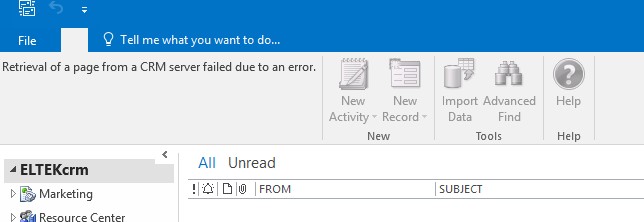
e90169a7_2D00_e0dc_2D00_4165_2D00_a0fd_2D00_536d16341c7e.jpg

Our CRM is on Update Rollup 18 (KB2958724). We are getting the same error for entire CRM and for all the users in both the outlook versions (2010 and 2016). Though CRM is working fine in web. I have gone through all the solutions available online but they are the fixes specific user and for specific entity. But here my issue is for all the users and entire CRM. I checked with my event logs and got following error details :

Faulting application name: Microsoft.Crm.Application.Outlook.WebFormsHost.exe, version: 5.0.9690.4376, time stamp: 0x541cc7f0

Faulting module name: unknown, version: 0.0.0.0, time stamp: 0x00000000

Exception code: 0xc0000005

Fault offset: 0x04fb9134

Faulting process id: 0x1e3c

Faulting application start time: 0x01d343fed97829a9

Faulting application path: C:\Program Files (x86)\Microsoft Dynamics CRM\Client\res\web\bin\Microsoft.Crm.Application.Outlook.WebFormsHost.exe

Faulting module path: unknown

Report Id: 63526ea8-46c0-459b-9700-509013d7c859

and another error is:

Application: Microsoft.Crm.Application.Outlook.WebFormsHost.exe

Framework Version: v4.0.30319

Description: The process was terminated due to an unhandled exception.

Exception Info: System.NullReferenceException

at Microsoft.Crm.Application.Utility.OutlookClientContextFactory.OutlookContext()

at Microsoft.Crm.Outlook.Services.WebFormsHost.Program.SetupClientContext()

at Microsoft.Crm.Outlook.Services.WebFormsHost.Program.Main(System.String[])

Can you please suggest any possible solution which can help me out of this issue?

*This post is locked for comments

I have the same question (0)
  • Suggested answer
    Alessandro Graps Profile Picture
    2,664 on at

    Try that:

    Reg edit → HKEY_CURRENT_USER → Software → Microsoft → MSCRMClient → added a new DWORD 32 key named as 'UseWebFormProcessIsolation' → Set the value to 0 → Restart Outlook.

    Thanks

    Alessandro

  • Community Member Profile Picture
    6,120 on at

    We are also seeing the same issue with our Outlook clients, the solution below does not work in our situation.

  • Community Member Profile Picture
    6,120 on at

    Hi ,

    Is this issue still occurring i have two users that have this issue in there outlook. I have tried reinstalling the plugin same issue. They cannot see the content of the folders

    Thanks,

  • Community Member Profile Picture
    6,120 on at

    Any fix found on this ?

  • Community Member Profile Picture
    6,120 on at

    No.. We couldn't find any solution yet

  • Verified answer
    Community Member Profile Picture
    6,120 on at

    I had to remove update kb4011196 on our PC's and everything would work ok again, then block the patch in WSUS. Come on Microsoft these patches for Office seem to have been a nightmare recently.

  • Verified answer
    NicolasBrandl Profile Picture
    170 on at

    As rhill52 stated, uninstalling KB4011196 solves this issue (tested on Windows 7 64bits, Oultook 2010 64 bits, CRM 2011 UR18). After removing the update, all started working again.

  • Community Member Profile Picture
    6,120 on at

    We have the same issue, but affecting users that don't have this KB update installed. Any other ideas?

  • Community Member Profile Picture
    6,120 on at

    The reason should because of the latest office update

    78052.Capture.PNG

    You can revert back to old version.

  • Suggested answer
    Community Member Profile Picture
    6,120 on at

    Hello, please check this out:

    https://support.microsoft.com/en-us/help/4049314/microsoft-dynamics-365-for-outlook-is-unable-to-render-webpages-after

    this fixed a problem for me.

    Best regards, Dan

Under review

Thank you for your reply! To ensure a great experience for everyone, your content is awaiting approval by our Community Managers. Please check back later.

Helpful resources

News and Announcements

[Smoke test 2510.1]

Quick Links

Mansi Soni – Community Spotlight

We are honored to recognize Mansi Soni as our August 2025 Community…

Announcing our 2025 Season 2 Super Users!

A new season of Super Users has arrived, and we are so grateful for…

Congratulations to the July Top 10 Community Leaders!

These are the community rock stars!

Leaderboard > 🔒一 Microsoft Dynamics CRM (Archived)

Last 30 days Overall leaderboard

Featured topics

Product updates

Dynamics 365 release plans
