web
You’re offline. This is a read only version of the page.
close
Skip to main content

Notifications

Announcements

Community site session details

Community site session details

Session Id :
Finance | Project Operations, Human Resources, ...
Unanswered

Workflow Stopped

(0) ShareShare
ReportReport
Posted on by

Hi All.

Recently a change has been done in purchase ledger workflow. After that change when i approve intercompany free text vendor invoice, workflow gets stopped and below error comes.

Stopped (error): X++ Exception: The condition could not be evaluated. No data has been returned.
at SysWorkflowEvaluationProvider-evaluateCondition
SysWorkflowEvaluationProvider-evaluate
SysWorkflowQueue-resume

Please see the workflow below.
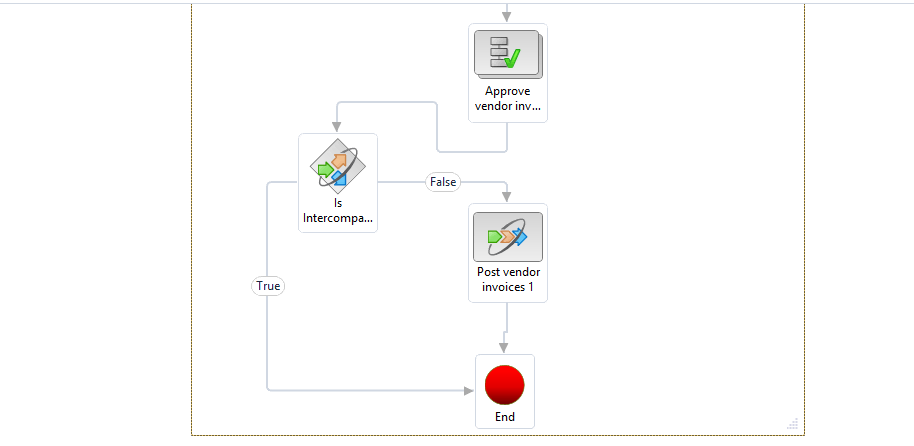
pastedimage1578897246325v1.png

In the previous version of the workflow(autoposting) it is working fine. After the workflow change this gives error.

Anyone faced this issue before?. Kindly help.

I have the same question (0)
  • André Arnaud de Calavon Profile Picture
    Super User 2025 Season 2 on at

    Hi Uk257,

    I did assume you were using the vendor invoice workflow which is linked to purchase orders. Can you tell which exact workflow type you used? Is it the vendor journal workflow?

  • Uk257 Profile Picture
    on at

    Hi, MATTGUO.

    Yes, we have more than 30 internal vendors.

    Thanks.

  • MATTGUO Profile Picture
    Moderator on at

    Hi Uk257,

    Do you have a lot of internal vendors?

    If not, you can set up specific vendors.

  • Uk257 Profile Picture
    on at

    Hi, Andre.

    We assume that the error occurs only for the free text vendor invoice(invoice without purchase order) as we given a condition that looking for the vendor group value on the purchase order.

    So the error is coming when we post the free text invoice it gives the error because no purchase order attached to it.

    Is our assumption is correct?

    Also if it is correct, how we can overcome this issue?

    Please help.

    Thanks.

  • Uk257 Profile Picture
    on at

    No, Andre. It contains only vendor group value(INT). Not any special characters.

    Thanks.

  • André Arnaud de Calavon Profile Picture
    Super User 2025 Season 2 on at

    The condition looks logical. Does the value (made invisible to us) contains some special characters?

  • Uk257 Profile Picture
    on at

    Hi Andre,

    This is the previous version we used. Please find below screenshot.

    pastedimage1578907193190v1.png

  • Uk257 Profile Picture
    on at

    Hi, Andre.

    We have added the below condition to check if the invoice is inter-company order. Then we need to post this manually after approval. Please check below screenshot.

    pastedimage1578902020084v1.png

  • André Arnaud de Calavon Profile Picture
    Super User 2025 Season 2 on at

    Hi Uk257,

    Can you tell what exact changes were done in this version of your workflow configuration? Did you add or change the condition? What properties are set as condition?

Under review

Thank you for your reply! To ensure a great experience for everyone, your content is awaiting approval by our Community Managers. Please check back later.

Helpful resources

Quick Links

Mansi Soni – Community Spotlight

We are honored to recognize Mansi Soni as our August 2025 Community…

Announcing our 2025 Season 2 Super Users!

A new season of Super Users has arrived, and we are so grateful for…

Congratulations to the July Top 10 Community Leaders!

These are the community rock stars!

Leaderboard > Finance | Project Operations, Human Resources, AX, GP, SL

Last 30 days Overall leaderboard

Product updates

Dynamics 365 release plans