web
You’re offline. This is a read only version of the page.
close
Skip to main content

Notifications

Announcements

Community site session details

Community site session details

Session Id :
Microsoft Dynamics 365 | Integration, Dataverse...
Suggested Answer

Exporting the Security Roles and Privileges to Excel

(0) ShareShare
ReportReport
Posted on by 210

Hi Guys/Experts, I have the task to compare the two security roles along with the privileges. I did explorer the tools available to achieve my objective. So I found the below blog

http://dotnetdeveloper2012.blogspot.com/2018/09/dynamics-crm-export-security-role.html

Then, I tried the tool what is stated in the blog. it did not work. I think new version of the tool is required for this. Error information is as below

Santosh bhagat please see the error as below. As you are the author of this tool, Please fix this issue and provide us this cool tool for many D365 users to use. 
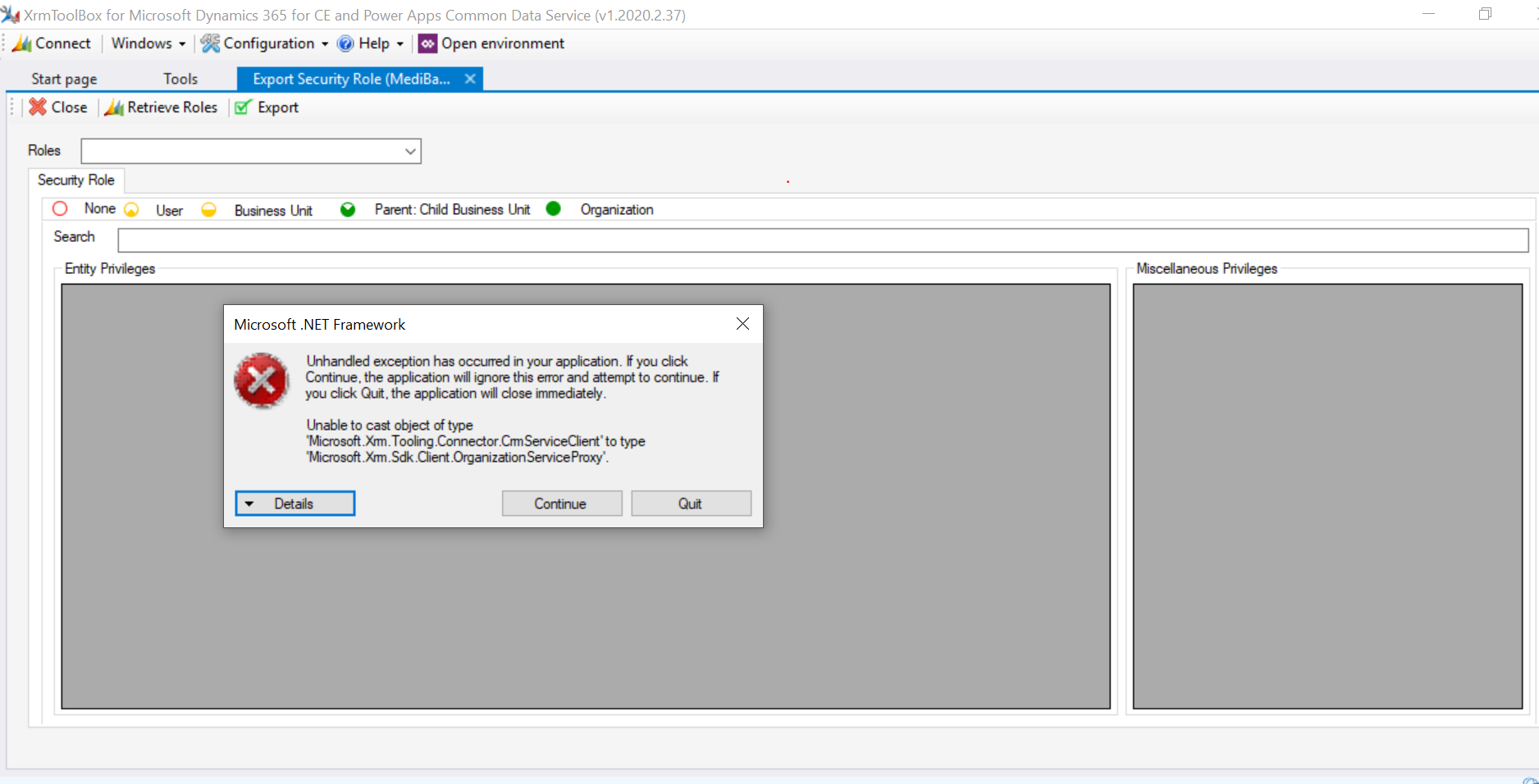
pastedimage1584589045506v1.png

Has anybody come across with any issues like this before? 

It would be really helpful if anyone can recently used the above tool and got it working. 

I have the same question (0)
  • Suggested answer
    LuHao Profile Picture
    40,888 on at

    Hi Satkunam,

    The "Export Security role" tool is no longer available. Its new name is Entity Security Role.

    pastedimage1584598370092v1.png

    pastedimage1584598823590v5.png

    Please install Entity Security Role to continue your work.

    ------------------------------------

    If you want to compare permisssions between security roles, I would recommedn you use CRM Security Role Compare Tool.

    pastedimage1584598546559v2.png

    Open it, first click Load Roles, then select security roles, click Compare selected roles, you will see their difference.

    pastedimage1584598656473v3.png

  • Suganthar_Satkunam Profile Picture
    210 on at

    Thanks for the info. I already tried the CRM Security Role Compare Tool. The Issue there was that I can not see the level of privileges. See the screenshot below. So i could not distinguish whether it is Organisational level/BusinessUnit Level or User Level.

    pastedimage1584615814052v1.png

    What version of the XRM Tool box are you using

  • Paul_Owen Profile Picture
    2,027 on at

    There is an OOB report called User Summary which will show you all Users and their assigned roles if that helps?

    Regards

    Paul

  • LuHao Profile Picture
    40,888 on at

    Hi Satkunam,

    The version of the XrmToolBox I use is 1.2020.2.37, which is the latest version.

    pastedimage1584672121859v1.png

    For CRM Security Role Compare Tool, could you try switching the filter to see if it helps?

    pastedimage1584672361988v2.png

    Also, have you successfully used the Entity Security Role Tool?

  • Suganthar_Satkunam Profile Picture
    210 on at

    Hi Hao, I'm using the latest version as you And tried as you mentioned above. it is same

    pastedimage1584694440205v1.png

    I do not what I'm missing here oppose to your solution

  • LuHao Profile Picture
    40,888 on at

    Hi Satkunam,

    This is weird.

    Please select the system administrator to compare with another security role to see if the problem persists.

  • Suganthar_Satkunam Profile Picture
    210 on at

    Hi, I managed to get the source code from the XRM Tool Box Developer and managed to manually run it from VS.

Under review

Thank you for your reply! To ensure a great experience for everyone, your content is awaiting approval by our Community Managers. Please check back later.

Helpful resources

News and Announcements

[Smoke test 2510.1]

Quick Links

Mansi Soni – Community Spotlight

We are honored to recognize Mansi Soni as our August 2025 Community…

Announcing our 2025 Season 2 Super Users!

A new season of Super Users has arrived, and we are so grateful for…

Congratulations to the July Top 10 Community Leaders!

These are the community rock stars!

Leaderboard > Microsoft Dynamics 365 | Integration, Dataverse, and general topics

Last 30 days Overall leaderboard

Product updates

Dynamics 365 release plans
